What is AppAmbit?
AppAmbit is a modern observability and distribution platform designed for mobile and desktop applications that allows development teams to track, debug, and improve their apps from a single dashboard.
With a lightweight SDK and minimal setup, AppAmbit enables you to:
- Collect real-time telemetry and analytics
- Capture crash reports with full stack traces
- Log handled and unhandled errors
- Track custom user events
- Monitor sessions automatically
- Distribute builds directly from your repository
All collected data is batched efficiently and transmitted to the AppAmbit backend with offline support, allowing applications to continue functioning even without network connectivity.
Telemetry in AppAmbit
Telemetry refers to the automatic collection of technical and behavioral data from your application while it is running in production environments.
AppAmbit provides built-in telemetry capabilities that allow developers to:
- Monitor application lifecycle sessions
- Track user interactions through events
- Capture structured logs and handled exceptions
- Automatically record crashes with diagnostic stack traces
This telemetry is collected in real time and sent to the AppAmbit platform, allowing teams to analyze application behavior and detect issues as they occur in production environments rather than relying on manual testing alone.
Why Telemetry Matters (and How It Adds Value)
Without telemetry, development teams often rely on user reports to detect failures — which usually means:
- Missing context
- Delayed issue discovery
- Difficult reproduction
- Increased downtime
By implementing telemetry through AppAmbit, teams gain:
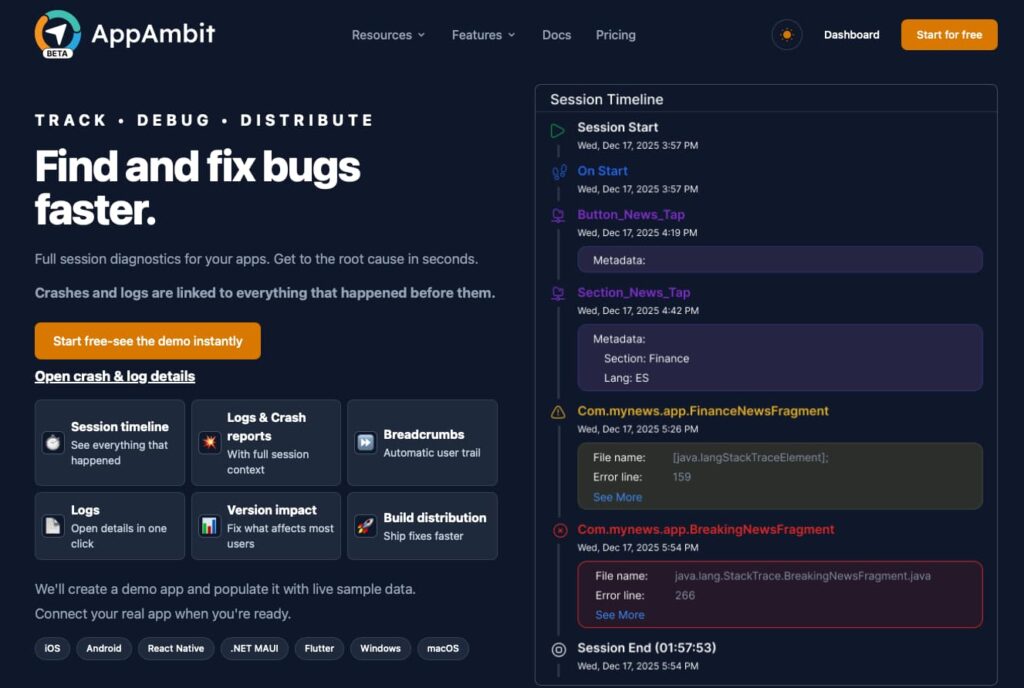
- Immediate visibility into crashes and runtime errors
- Insight into what the user was doing before a failure occurred
- Faster debugging and root cause analysis
- Reduced Mean Time To Resolution (MTTR)
- Data-driven product decisions based on real usage patterns
This allows engineering teams to proactively detect regressions, prioritize fixes based on impact, and continuously improve the user experience in production environments.
How to use it?
Below are simple SDK usage examples based on the official documentation.
Initialization
iOS
Add this to your Podfile:
pod 'AppAmbitSdk'
# or specify version
pod 'AppAmbitSdk', '~> X.Y.Z'Then run:
pod install
Start the SDK with a valid APPKEY
import AppAmbit;
AppAmbit.start(appKey: "<YOUR-APPKEY>")Android
Open the build.gradle file at the project application level (app/build.gradle):
dependencies {
    implementation 'com.appambit:appambit:0.1.0'
    ...
}Add the following line inside the onCreate callback of your app’s main Activity class:
Start the SDK with a valid APPKEY
AppAmbit.start(this, "<YOUR-APPKEY>");
.NET (C# – MAUI)
Add the package to your MAUI project:
dotnet add package com.AppAmbit.Maui
# or specify version
dotnet add package com.AppAmbit.Maui --version X.Y.ZStart the SDK with a valid APPKEY
using AppAmbitMaui;

public static class MauiProgram
{
    public static MauiApp CreateMauiApp()
    {
        var builder = MauiApp.CreateBuilder();
        builder
            .UseMauiApp<App>()
            .UseAppAmbit("<YOUR-APPKEY>");

        return builder.Build();
    }
}Android
Generate a Test Crash
Crashes.generateTestCrash()Log a Handled Exception
try {
    val result = 10 / 0
} catch (e: Exception) {
    Crashes.logException(e)
}Track a Custom Event
Analytics.trackEvent("PurchaseCompleted")You can also send custom properties:
val properties = mapOf(
    "productId" to "premium_subscription",
    "price" to "9.99",
    "currency" to "USD"
)

Analytics.trackEvent("PurchaseCompleted", properties)iOS
Generate a Test Crash
Crashes.generateTestCrash()This triggers a crash to verify crash reporting integration.
Log a Handled Error
do {
  throw NSError(
  domain: "com.example.app",
  code: 1001,
  userInfo: [NSLocalizedDescriptionKey: "Invalid operation"]
  )
}catch let error {
  Crashes.logError(exception: error)
}This captures a handled exception without terminating the app.
Track a Custom Event
Analytics.trackEvent(eventTitle: "PurchaseCompleted")
With properties:
Analytics.trackEvent(
  eventTitle: "PurchaseCompleted",
  properties: [
    "productId": "premium_subscription",
    "price": "9.99",
    "currency": "USD"
  ]
).NET (C# – MAUI)
Generate a Test Crash
Crashes.GenerateTestCrash();This forces a crash to validate reporting in production builds.
Log a Handled Exception
try
{
  var result = 10 / 0;
}
catch (Exception ex)
{
  Crashes.LogException(ex);
}This logs the exception without crashing the application.
Track a Custom Event
Analytics.TrackEvent("PurchaseCompleted");With properties:
Analytics.TrackEvent("Audio started", new Dictionary<string, string> {
    { "Category", "Music" },
    { "FileName", "favorite.mp3"}
});
AppAmbit Dashboard
Audience Section
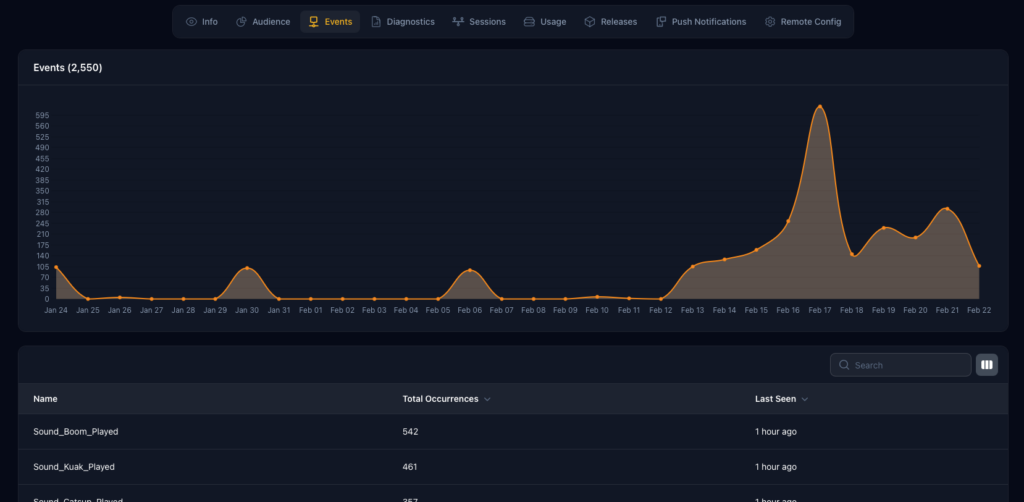
Gain insights into your user base by understanding who is using your application, how often they engage with it, and how your audience evolves over time. This section helps you identify active users, usage trends, and overall adoption across your releases.
Events Section
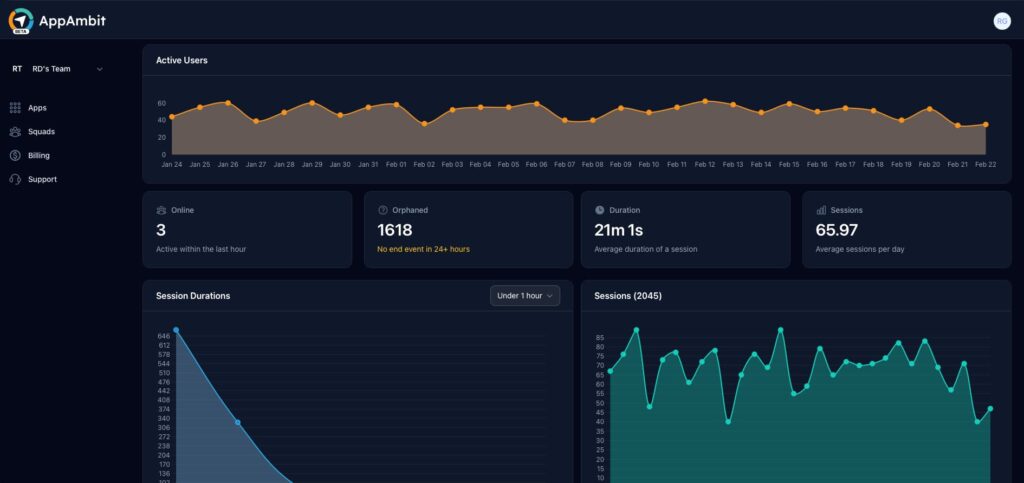
Track and analyze custom events generated within your application to better understand user behavior and feature usage. Use this data to monitor interactions, measure engagement, and correlate user actions with performance or stability metrics.
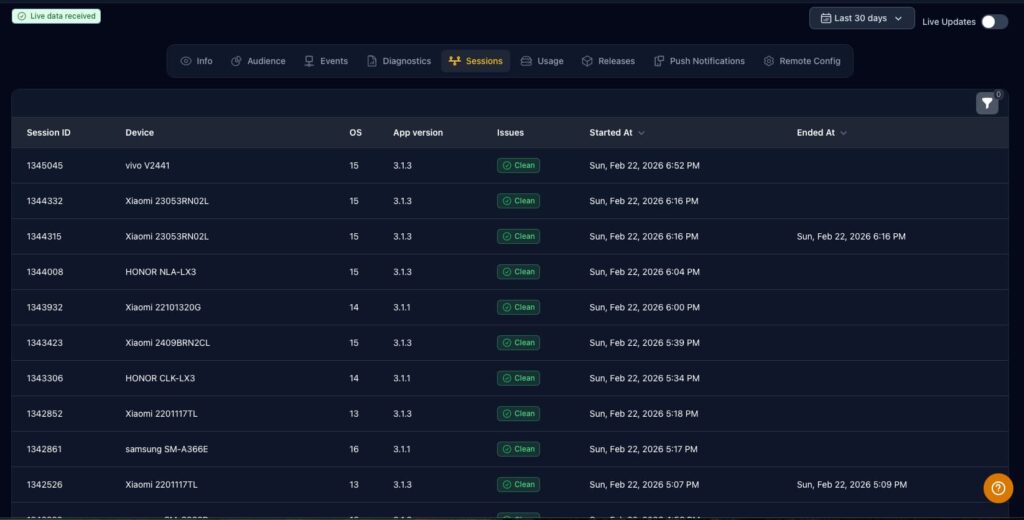
Sessions Section
Monitor application usage through automatically tracked sessions. This section provides visibility into session frequency, duration, and distribution, helping you evaluate user engagement and detect potential usage anomalies across different app versions.
Implementing telemetry with AppAmbit gives development teams the ability to move from reactive debugging to proactive monitoring.
By initializing the SDK at application startup and leveraging built-in services such as crash reporting, handled exception logging, and custom event tracking, teams can gain real-time visibility into how their applications behave in production environments. This not only accelerates issue detection and root cause analysis, but also provides meaningful insights into user behavior and system performance.
With this level of observability in place, engineering teams can:
- Detect and resolve issues before they impact a large number of users
- Prioritize fixes based on real production data
- Improve application stability across releases
- Make informed, data-driven product decisions
Ultimately, integrating AppAmbit helps ensure a more reliable user experience while reducing downtime and improving overall development efficiency throughout the software lifecycle.